Introduction to Pytorch
- Pytorch Tensor Library
- Computation Graphs and Autograd
- Pytorch Modules
- The torch.optim package
Pytorch Tensor Library torch.Tensor
Deep learning frameworks use an object called a Tensor to represent structured data. Tensors are a generalization of a matrix that can represent high dimensional data. Tensors have a property called Rank. This is the number of indices required to address any single element of the tensor.
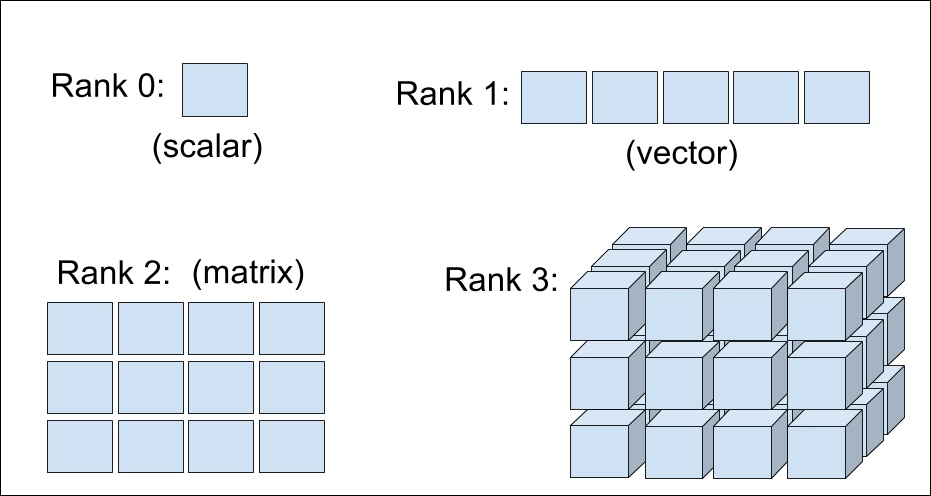
Pytorch's tensor API is largely a copy of the Numpy API
Creating Tensors
Tensors can be created with python lists as well as several other ways.
import torch

t = torch.tensor([3, 7, 1])
print(t)

t = torch.tensor([[ 2, 5 ],[ 3, 9 ]])
print(t)
tensor([3, 7, 1])
tensor([[2, 5],
        [3, 9]])
Indexing Tensors
Indexing a tensor produces a tensor of lower rank.
t = torch.tensor([[ 2, 5 ],[ 3, 9 ]])  # rank 2 tensor

print(t[0])  #  returns a rank 1 tensor
tensor([2, 5])
print(t[0][0]) # returns a rank 0 tensor. Equivalently t[0,0]
tensor(2)
Slicing Tensors
Like numpy arrays, tensors can be sliced along axes.
t = torch.tensor([[1,1,1],[2,2,2],[3,3,3]])
print(t)
tensor([[1, 1, 1],
        [2, 2, 2],
        [3, 3, 3]])
print(t[0,:])
print(t[1,:])
tensor([1, 1, 1])
tensor([2, 2, 2])
print(t[:,0])
tensor([1, 2, 3])
print(t[0:2, 1:])
tensor([[1, 1],
        [2, 2]])
Tensor Shape and Reshaping
The shape of a tensor tells you the size along each of its dimensions. The length of the shape is the tensors rank. Tensors can be reshaped into a different rank with the same total number of elements.
t = torch.tensor([[1,1,1],[2,2,2],[3,3,3],[4,4,4]])
print(t.shape)
torch.Size([4, 3])
r = t.view(12)
print(r)
tensor([1, 1, 1, 2, 2, 2, 3, 3, 3, 4, 4, 4])
r = t.view(2,-1)  # -1 tell the tensor to figure out what number should go there based on the number of elements
print(r)
tensor([[1, 1, 1, 2, 2, 2],
        [3, 3, 3, 4, 4, 4]])
Operations on Tensors
There are a large number of math operations and other miscellaneous operations available to tensors. Normal math operations (+, *, etc...) Always Operate Elementwise.
x = torch.tensor([1,1])
y = torch.tensor([2,2])
z = x + y
print(z)
tensor([3, 3])
Note: This is not the case for operations that specifically define how elements operate, e.g. matrix multiplication, concatenate.
z = torch.cat([x,y])  #concatenate along the first axis
print(z)
tensor([1, 1, 2, 2])
Tensor Broadcasting
torch.ones((3,2)) * 2
tensor([[2., 2.],
        [2., 2.],
        [2., 2.]])
But doesnt this break our rule that tensors operate elementwise?
Rank 2 * Rank 0
What is actually happening in our example?
torch.ones((3,2)) * 2
tensor([[2., 2.],
        [2., 2.],
        [2., 2.]])
torch.ones((3,2)) * torch.tensor([[2.,2],[2,2],[2,2]])
tensor([[2., 2.],
        [2., 2.],
        [2., 2.]])
Broacasting replicates the scalar enough times to have the same number of elements as the first tensor.
Tensor Broadcasting
Broadcasting is a method by which tensors of different size or rank can operate together. Two tensors are “broadcastable” if the following rules hold:
Each tensor has at least one dimension.
When iterating over the dimension sizes, starting at the trailing dimension, the dimension sizes must either be equal, one of them is 1, or one of them does not exist.
x = torch.zeros((2,3,2))
y = torch.ones((   3,2))
print(x+y)
tensor([[[1., 1.],
         [1., 1.],
         [1., 1.]],

        [[1., 1.],
         [1., 1.],
         [1., 1.]]])
x = torch.zeros((2,3,2))
y = torch.ones(( 1,3,2))
print(x+y)
tensor([[[1., 1.],
         [1., 1.],
         [1., 1.]],

        [[1., 1.],
         [1., 1.],
         [1., 1.]]])
x = torch.zeros((2,3,2))
y = torch.ones((     2))
print(x+y)
tensor([[[1., 1.],
         [1., 1.],
         [1., 1.]],

        [[1., 1.],
         [1., 1.],
         [1., 1.]]])
x = torch.zeros((2,3,2))
y = torch.ones((   3,3))
print(x+y)
---------------------------------------------------------------------------
RuntimeError                              Traceback (most recent call last)
<ipython-input-49-ff950f9dcf68> in <module>
      1 x = torch.zeros((2,3,2))
      2 y = torch.ones((3,3))
----> 3 print(x+y)

RuntimeError: The size of tensor a (2) must match the size of tensor b (3) at non-singleton dimension 2
Einstein Notation and the EinSum
A notation convention introduced by Einstein in 1916. It uses indices to imply summation to make for a compact representation. Repeated indices are summed over. For $i \in {1,2,3}$,
$$ \large y = \sum_{i} a_i x_i = a_1 x_1 + a_2 x_2 + a_3 x_3 $$
This can more compactly be written as
$$
\Large
y = a_i x_i
$$
A less trivial example...
Matrix-Vector multiplication
$$ A = \begin{bmatrix} a_{11} & a_{12} & a_{13} \\ a_{21} & a_{22} & a_{23} \\ a_{31} & a_{32} & a_{33} \\ \end{bmatrix}, \quad X = \begin{bmatrix} x_{1} \\ x_{2} \\ x_{3} \\ \end{bmatrix} \quad \quad Y = AX = \sum_j a_{ij} x_j, \quad Y = \begin{bmatrix}y_1 \\ y_2 \\ y_3 \\ \end{bmatrix} $$
Can be written as,
$$
\Large
y_i = a_{ij} x_j
$$
Notice that the number of indices on a tensor corresponds to its rank. A tensor with no indices is a scalar (rank 0)
Operations using EinSum
Operations represented by Einstein notation can be done with the torch.einsum() function. This is a very general operation that can do almost any linear algebra operation you need.
a, x = torch.rand(3), torch.rand(3)
y = torch.einsum("i,i ->", a, x)
y
tensor(0.3633)
A = torch.ones(3, 3)
X = torch.tensor([1.0, 2.0, 3.0])
Y = torch.einsum("ij, j -> i", A, X)
Y
tensor([6., 6., 6.])
EinSum to permute
x = torch.rand(2,3,5)
y = torch.einsum("ijk->kji", x)
y.shape
torch.Size([5, 3, 2])
x = torch.rand(2,3)
a = torch.rand(3,1)
y = torch.einsum("ij, jk -> ki", x, a)
y.shape
torch.Size([1, 2])
Some Other Operations
A = torch.rand(3, 3)
B = torch.rand(3, 3)

# Dot Product
torch.einsum("ij, ij->", A, B)

# Hadamard Product
torch.einsum("ij, ij -> ij", A, B)

# Diagonal
torch.einsum("ii -> i", A)

# Trace
torch.einsum("ii ->", A)
Computation Graphs and Autograd
Automatic Differentiation is the core of every deep learning library (Called Autograd in Pytorch). It is used to calculate the derivatives (gradients) of a function by using the chain rule and black magic.
Training every neural network consists of two phases:
- Forward pass - calculate output of the network starting at the inputs
- Backward pass - backpropagation to compute all of the gradients starting with the output
All math operations in the forward pass are represented by a Computation Graph
Representing Computation as a Graph
b = w1 * a
c = w2 * a
d = w3 * b + w4 * c
L = 10 - d
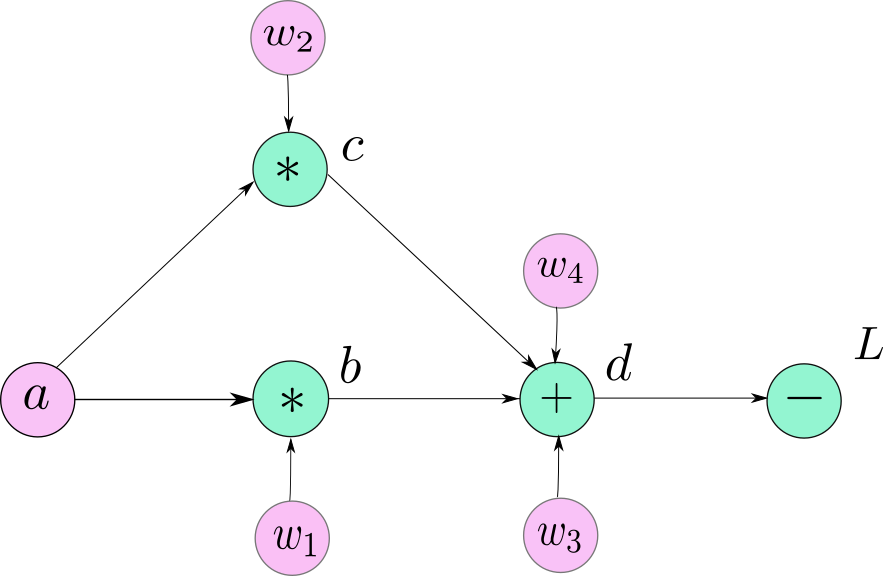
The gradients we need to find are:
In other words, how does the network output ($L$, or the loss) change as we change each of our parameters ($w_i$ or the weights).
Our job when writing a pytorch model is to define the computation graph so that the Autograd library can find these gradients automatically.
Pytorch Autograd - torch.nn.Autograd
In pytorch, the gradients and the associated operations are kept track of inside of each tensor if its member requires_grad=True.
y = torch.ones((2,2), requires_grad=True)
y.requires_grad
True
a = torch.tensor([1.], requires_grad=True)
w1 = torch.tensor([1.], requires_grad=True)
w2 = torch.tensor([1.], requires_grad=True)
w3 = torch.tensor([1.], requires_grad=True)
w4 = torch.tensor([1.], requires_grad=True)

b = w1 * a
c = w2 * a
d = w3 * b + w4 * c
L = 10 - d
b, d
(tensor([1.], grad_fn=<MulBackward0>), tensor([2.], grad_fn=<AddBackward0>))
Note: The backward functions are stored in the tensors themselves. There is no "central" representation of the computation graph.
Pytorch Functions - torch.nn.Autograd.Function
All math operations are defined in the Function class. Function has two important methods:
forward- Simply computes the output of the function given the inputsbackward- Take gradients from later parts of the computation graph and computes the gradients relative to the inputs. It then sends these gradients to earlier parts of the computation graph and invokes theirbackwardfunctions.
print(L)
L.backward()
print(w4.grad)
tensor([8.], grad_fn=<RsubBackward1>)
tensor([-1.])
Pytorch vs. Tensorflow
In Tensorflow the computation graph is defined at initialization and the graph is run by simply passing all the inputs through it.
In Pytorch the computation graph is built up from the operations contained in the tensors. After a call to backward all grad_fn references are destroyed. The next forward pass of the graph recreates each of these. This means the computation graph can change at run time.
Tensorflow - Static Computation Graph
Pytorch - Dynamic Computation Graph
* Tensorflow 2.0 uses eager execution which gives it some dynamic graph capabilities
Now we know about tensors, computation graphs and how to calculate gradients. Lets move on to how we will build our graphs.
Pytorch Modules - torch.nn.Module
In Pytorch we create computation graphs with Modules. There are many prebuilt ones but the Module class allows us to create our own as well.
Neural networks tend to have their computation graph organized into layers. This is the same as how we stacked layers of perceptrons previously. A layer of perceptrons, which is a linear combination of its inputs, is implemented in a module conveniently called Linear.
lin = torch.nn.Linear(in_features=3, out_features=5)

x = torch.tensor([1.,2.,3.])
lin(x)
tensor([-0.8849, 0.4273, -2.3330, 1.4144, 1.0879], grad_fn=<AddBackward0>)
Layers can be stacked together
The output of one layer can be fed into the input of another. This is how we create the stacked structure of a typical neural network.
x = torch.tensor([1.,2.,3.])

lin1 = torch.nn.Linear(in_features=3, out_features=5)
lin2 = torch.nn.Linear(in_features=5, out_features=4)

hidden = lin1(x)
output = lin2(hidden)
output
tensor([-0.6024, -0.5019, 1.1678, 0.9438], grad_fn=<AddBackward0>)
Using Module to Build a Network
Modules can contain other modules. This is how we build up more complicated graphs and keep them in easy to use packages. To make a module you only need to overload the __init__() and forward() functions. Lets also throw in some activations.
class MyCoolNet(torch.nn.Module):
    def __init__(self, in_size, out_size):
        super(MyCoolNet, self).__init__()

        self.lin1 = torch.nn.Linear(in_size, 10)
        self.lin2 = torch.nn.Linear(10, 15)
        self.lin3 = torch.nn.Linear(15, 10)
        self.lin4 = torch.nn.Linear(10, out_size)
        self.relu = torch.nn.ReLU()
        self.sig = torch.nn.Sigmoid()

    def forward(self, x):
        hidden = self.relu(self.lin1(x))
        hidden = self.relu(self.lin2(hidden))
        hidden = self.relu(self.lin3(hidden))
        output = self.sig(self.lin4(hidden))

        return output
Now we can use our network just like we used the Linear layer earlier.
model = MyCoolNet(in_size=5, out_size=5)

x = torch.tensor([1.,2,3,4,5])
model(x)
tensor([0.4050, 0.4399, 0.5060, 0.5242, 0.4559], grad_fn=<SigmoidBackward>)
We can now build computation graphs, send tensors through them, and calculate their gradients. All thats left is to use the gradients to adjust the weights.
The torch.optim Package
We have explored tensors, computation graphs and the ability to calculate their gradients. Now we need to adjust the weights of the network based on their gradients. This is done with the torch.optim package.
This package contains all of the optimizers that are available for use in Pytorch, as well as the framework to make new ones.
We will explore in detail an optimizer called Stochastic Gradient Descent (SGD) and then briefly describe more modern optimizers that are modifications of SGD.
Stochastic Gradient Descent
Remember from last time, we said that our update rule for the parameters of our graph (weights) was:
$$
\large
w_{t+1} = w_t - \alpha \frac{\partial L}{\partial w}
$$
In words, for each parameter in in the graph, the current value $w_{i+1}$ is the previous value $w_i$ minus the gradient of $L$.
This is the basic form of Stochastic Gradient Descent. It is stochastic because, in general, $\partial L / \partial w$ is the average gradient over a random subset of inputs from our dataset. We will focus on a particular variation of SGD called SGD with Momentum.
Momentum
To make SGD learn faster and be less likely to get stuck in local minima we can use a moving average. In this case we will use an exponentially weighted moving average.
$$
\large
V_t = \beta V_{t-1} + (1-\beta) \frac{\partial L}{\partial w}
$$
$V_t$ is called the momentum. We can now write our parameter update rule as:
$$
\Large
w_{t+1} = w_t - \alpha V_t
$$
Alpha is what is called the learning rate. Momentum has the effect of 'building up speed' to carry the optimizer through areas of low gradient where normally it would slow down more than desired.
Optimizers in Pytorch
To use SGD in Pytorch we just need to instantiate its class.
model = MyCoolNet(in_size=5, out_size=5)
optimizer = torch.optim.SGD(model.parameters(), lr=0.001, momentum=0.9)
# If we give no argument for momentum then standard SGD is used
Notice for us to initialize the optimizer we must pass the parameters of our model. This is so the optimizer knows which weights to adjust at each step.
We can now use this optimizer to minimize a loss function on our model.
Minimizing a Loss Function
Lets create a simple loss function and adjust the weights one step in the direction of the gradients.
model = MyCoolNet(in_size=5, out_size=5)
optimizer = torch.optim.SGD(model.parameters(), lr=0.1, momentum=0.8)

x = torch.tensor([1.,2,3,4,5])

for i in range(10):
    out = model(x)
    loss = torch.sum((0-out)**2)  #loss decreases as out->0

    loss.backward()   # Calculate gradients
    optimizer.step()  # Step all weights in the direction of gradient
    optimizer.zero_grad()
    print(f"Loss {i}: {loss.item()}")
Loss 0: 1.3889371156692505
Loss 1: 1.3281832933425903
Loss 2: 1.2424967288970947
Loss 3: 1.1397792100906372
Loss 4: 1.0178158283233643
Loss 5: 0.8763992190361023
Loss 6: 0.7107219099998474
Loss 7: 0.5144205093383789
Loss 8: 0.2940930128097534
Loss 9: 0.10847821831703186
Modern Optimizers
There are many variations on SGD that incorporate some sort of momentum. While these optimizers still show state of the art performance in some tasks, they take more care to get good performance. Newer adaptive methods solve many of the problems with SGD.
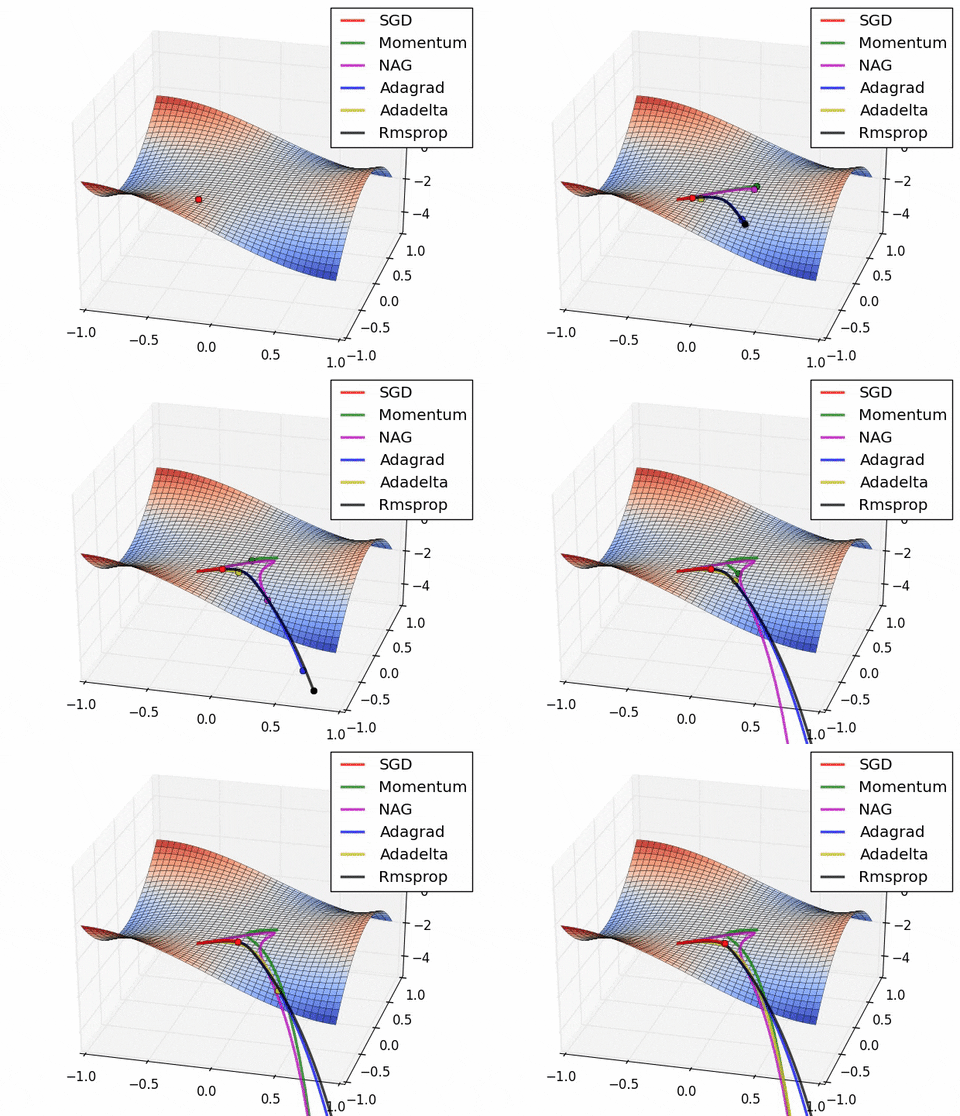
Adam
A modification of SGD that uses the first and second moments of the gradient to adjust the learning rate. Adam calculates these moments and adjusts the learning rate for each parameter. Building a new network? Start with Adam torch.optim.Adam().
$$
\Large
w_{t+1} = w_t - \eta \frac{\hat{m}_t}{ \sqrt{\hat{v}_t} + \epsilon }
$$LookAhead
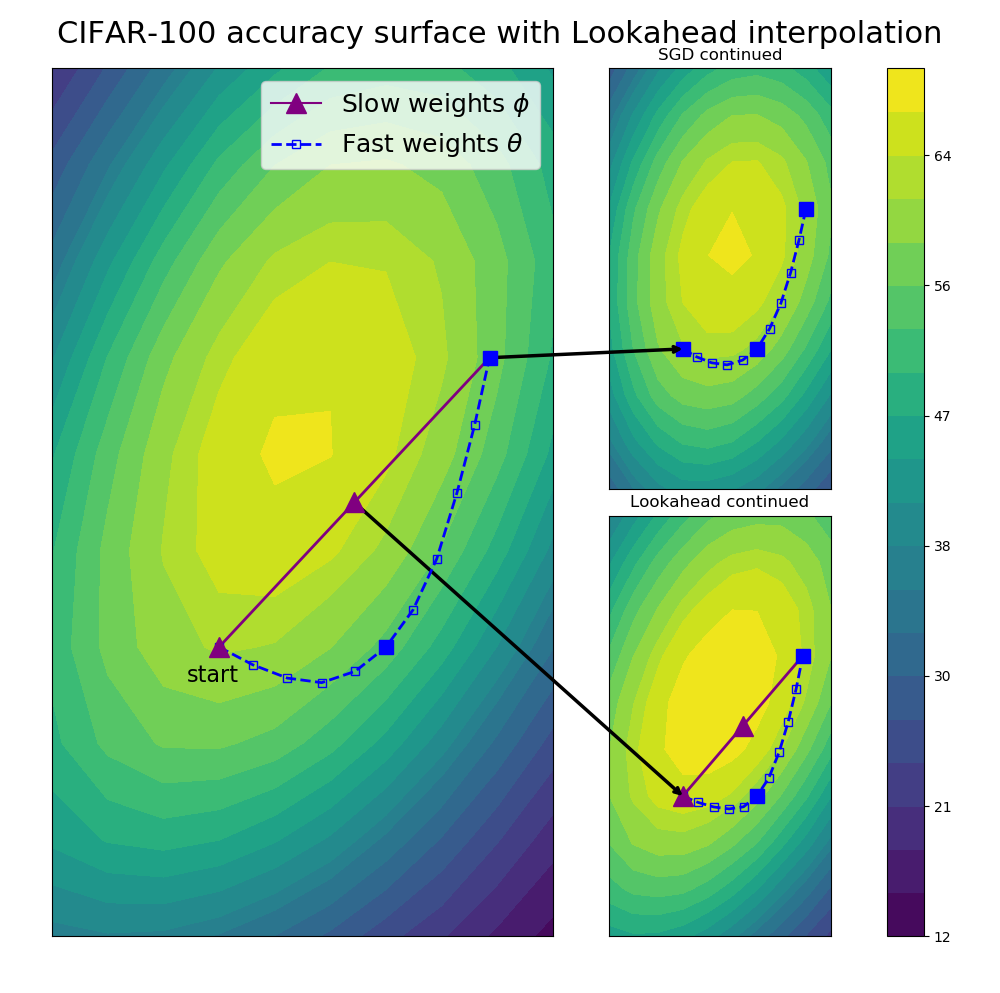
Uses a combination of two optimizers, a fast and slow one. The fast one explores the loss ahead of the slow one and after a number of iterations, the slow optimizer is then moved to the linear interpolation between the two. The fast optimizer could be any other optimizer. SGD, Adam, etc...